
From Baby Boomers to Total Newbies: The Only Website Platform Guide You’ll Ever Need
With so many website platforms out there — WordPress, Wix, Shopify, Squarespace, and dozens more — choosing the right one can feel overwhelming, especially if you’re not tech-savvy. Whether you’re a business owner exploring your first website or simply someone who’s never built one before, this guide breaks down the most popular platforms in plain language, so you can make a confident choice without the tech jargon.
The 6 Most Popular CMS Platforms
- WordPress — The world’s most widely used content management system, powering a huge portion of websites globally.
- Joomla — A flexible, open-source CMS popular for community-driven and membership-based websites.
- Drupal — A powerful, developer-focused CMS often used for large, complex, or highly customized sites.
- Magento — A robust CMS built specifically for e-commerce, popular with larger online stores.
- PrestaShop — An open-source e-commerce CMS popular with small to mid-sized online shops.
- OpenCart — A simple, lightweight e-commerce CMS aimed at beginners entering online selling.
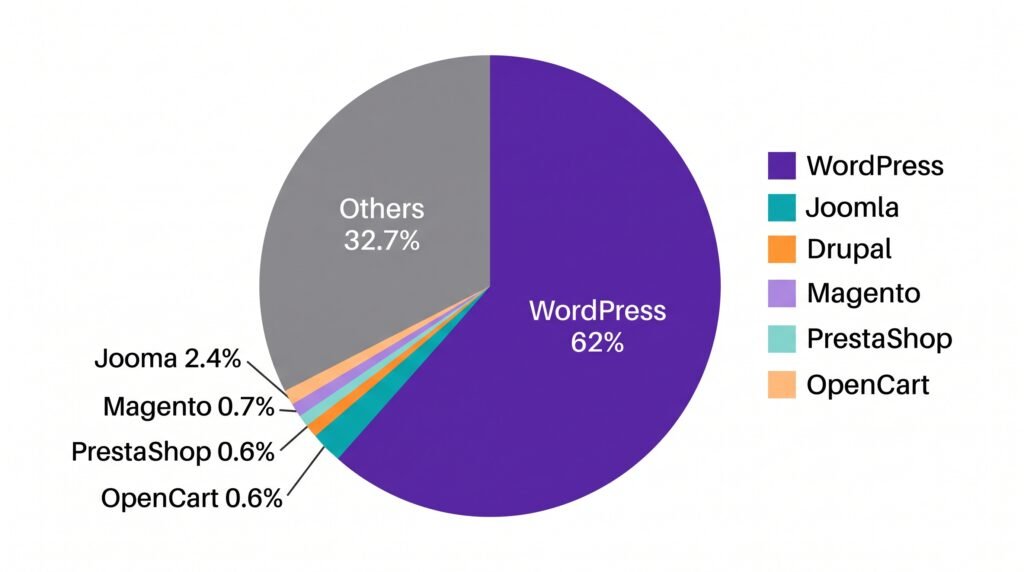
Source: W3Techs.com — Usage Statistics and Market Share of Content Management Systems (2026)
https://w3techs.com/technologies/overview/content_management
The 6 Most Popular Website Builders
- Wix — A beginner-friendly drag-and-drop builder known for ease of use and design flexibility.
- Squarespace — Known for sleek, designer-quality templates, popular with creatives and portfolios.
- Webflow — A more advanced visual builder offering designer-level control without full coding.
- Weebly — A simple, affordable builder good for small businesses and personal sites.
- GoDaddy Website Builder — An easy, all-in-one option bundled with domain and hosting services.
- Shopify — A dedicated e-commerce builder designed specifically for online stores.
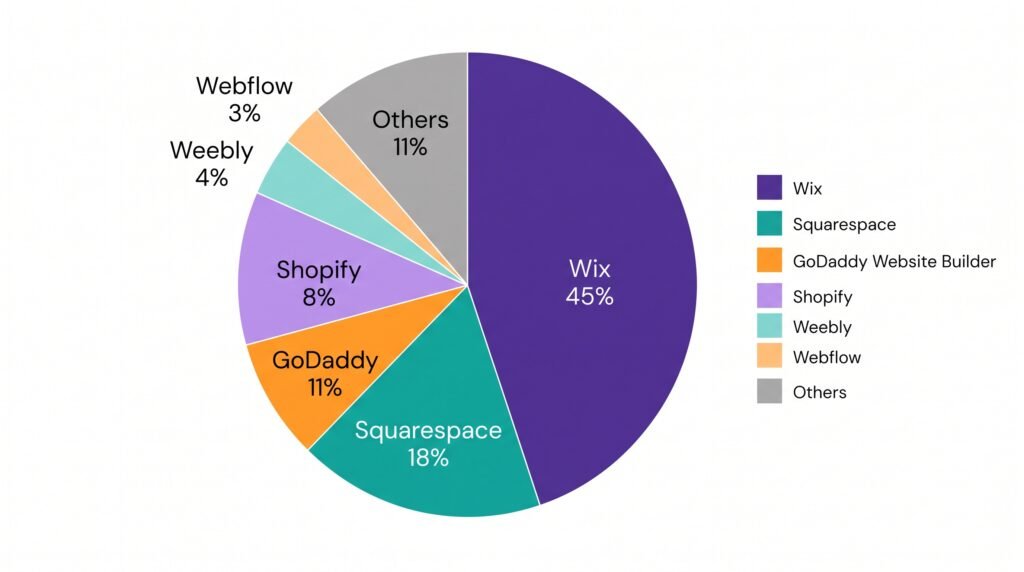
Source: W3Techs.com — Usage Statistics and Market Share of Content Management Systems (2026)
https://w3techs.com/technologies/overview/content_management
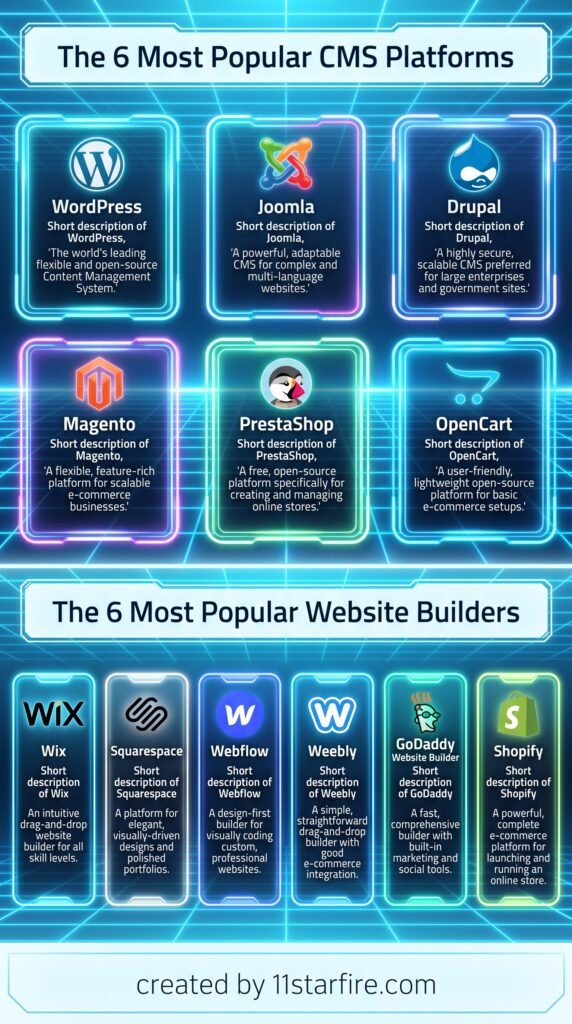
Pros and Cons at a Glance
| Platform | Type | 3 Pros | 3 Cons |
|---|---|---|---|
| WordPress | CMS | Huge flexibility, thousands of plugins, strong SEO capability | Steeper learning curve, requires maintenance, can be slow if not optimized |
| Joomla | CMS | Good for community sites, flexible user permissions, open-source | Smaller plugin ecosystem, less beginner-friendly, requires technical know-how |
| Drupal | CMS | Extremely powerful, highly customizable, strong security | Very technical, steep learning curve, needs developer support |
| Magento | CMS | Built for large stores, highly scalable, feature-rich | Expensive to maintain, requires developer expertise, resource-heavy |
| PrestaShop | CMS | Free core platform, e-commerce focused, decent flexibility | Can require coding for customization, hosting can get costly, smaller community |
| OpenCart | CMS | Simple setup, beginner-friendly for basic stores, free to use | Limited advanced features, fewer built-in marketing tools, basic design options |
| Wix | Builder | Very beginner-friendly, drag-and-drop design, all-in-one hosting | Harder to migrate later, limited advanced SEO control, can get costly at scale |
| Squarespace | Builder | Beautiful templates, great for portfolios, simple to use | Less flexible for complex sites, fewer third-party integrations, pricier plans |
| Webflow | Builder | Designer-level control, clean code output, strong for custom designs | Learning curve for beginners, pricier for advanced features, less beginner-friendly |
| Weebly | Builder | Affordable, simple interface, decent for small sites | Limited design flexibility, fewer advanced features, smaller app ecosystem |
| GoDaddy Website Builder | Builder | Very easy setup, bundled hosting/domain, budget-friendly | Limited customization, fewer advanced features, harder to scale later |
| Shopify | Builder | Built for e-commerce, strong app ecosystem, reliable hosting | Monthly fees plus transaction costs, limited outside e-commerce use, can get pricey with apps |
The Verdict: Cost and Who It’s For
| Platform | Typical Cost | Best For |
|---|---|---|
| WordPress | Low to moderate (hosting + optional plugins) | Businesses wanting flexibility, blogs, and long-term SEO growth |
| Joomla | Low (hosting-based) | Community sites, membership platforms |
| Drupal | Moderate to high (developer costs) | Large organizations, complex custom websites |
| Magento | High (hosting + development) | Large-scale online stores with complex needs |
| PrestaShop | Low to moderate | Small to mid-sized online shops on a budget |
| OpenCart | Low | Beginners starting a simple online store |
| Wix | Low to moderate (monthly plans) | Beginners wanting a quick, easy website |
| Squarespace | Moderate (monthly plans) | Creatives, portfolios, and visually-driven brands |
| Webflow | Moderate to high | Designers and businesses wanting custom, polished sites |
| Weebly | Low (monthly plans) | Small businesses on a tight budget |
| GoDaddy Website Builder | Low (monthly plans) | Absolute beginners wanting the simplest setup |
| Shopify | Moderate to high (monthly + transaction fees) | Businesses focused purely on online selling |
There’s no single “best” platform — only the best platform for your specific needs, budget, and technical comfort level. If you want long-term flexibility and strong SEO potential, WordPress remains a solid all-rounder. If you’re a complete beginner wanting something fast and simple, Wix or GoDaddy Website Builder might suit you better. If your focus is purely selling products online, Shopify is built exactly for that. Take stock of your budget, your goals, and how much time you’re willing to invest — and choose the platform that fits your life, not just what’s popular.